
RIOT 2026.10 — folders, saved settings, and a portable Windows build
RIOT 2026.10 is the second public build of the rebuilt Radical Image Optimization Tool. The optimizer, compare view, and codecs from 2026.9 are still there. This release is about getting pictures in, keeping the settings you already chose, and writing results without stepping on files you meant to keep.
Save your settings
Encode options no longer reset when you quit. The Preset control above Output format offers Default Settings (factory encode and handling) and Last Used (the left-column job you actually ran, including automatic preview). Last Used is stored in the preferences file and restored on the next launch. Destination folder is remembered separately, as is whether File handling, Metadata, Transparency, and Animation panels are expanded.

Collision policy
File handling now has an explicit collision policy. Don’t replace leaves the existing file and marks the item Skipped. Use a unique name (the default) writes beside the collision — a format change becomes photo.png.webp, then a timestamp if needed; the same format becomes photo_timestamp.jpg. Replace overwrites a same-format destination; overwriting a different extension needs a separate checkbox, off by default. If photo.webp already sits next to photo.png, RIOT will not replace that sibling unless you asked it to.
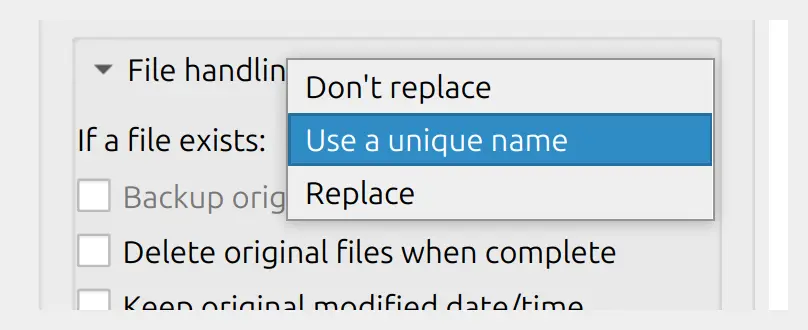
When an auto encode is not smaller, the list shows a warning instead of a quiet success, and the original is left alone unless Replace is on. Delete originals runs only after a real, different optimized file is written.
Portable version for Windows
Alongside the installer there is a Windows portable zip. Extract it and run; settings live in a riot-gui.ini next to the executable when that file is writable, so a USB stick or a shared machine does not touch the usual AppData profile. Installed copies still use the per-user config directory, as before.
Drag and drop folders
Drop a folder onto the list and RIOT collects the images inside. If that folder has subfolders, it asks whether to include those too. The same choice is on the menu: Add folder for one directory, Add folder (recursive) for the tree. You can point the app at a directory from the command line as well — --folder or --folder--recursive — and repeat either flag.
Open with, and a file on the command line
Pass one or more image paths when you start RIOT and they land in the list. A single file opens straight in compare; several files are queued for a batch. That is what file-manager Open with uses, including the Linux desktop entry. Missing paths are reported instead of failing silently.
Fixes
The batch summary now counts skipped files and warnings, not only successes and errors. A re-encode that grew the file is flagged. Unique names are not invented for a copy of the original you were about to discard. In-place Don’t replace skips rather than rewriting the source.
Download 2026.10 from the download page. The full list is in the changelog.