Free desktop image optimizer

RIOT

Radical Image Optimization Tool

A professional image optimizer for people who care about file size and picture quality. Automatic image optimization, multi-core batches, and a live original-versus-optimized preview — on macOS, Windows, and Linux. First released in 2008, and still free.

Desktop app for macOS, Windows, and Linux · Version 2026.9.1

Vintage computing hardware, nodding to RIOT’s long history
Since 2008

One of the oldest free image optimizers

Work on RIOT started in 2003 as a personal app. The first public release arrived in 2008 — a free optimization plugin for IrfanVIew and later GIMP, XnView and Paint.NET + standalone app, initially in a time when most “optimization” meant an export dialog in a few commercial programs. It may well have been the first dedicated standalone image optimizer. Twenty years on, 2026.9.1 rebuilds that idea for every desktop OS.

History & author
Features

Image optimization that stays on your machine

From cutting-edge automatic analysis and multi-core throughput down to themes and languages — the capabilities that matter when you compress a lot of pictures.

Earth from orbit, suggesting scale and speed in image optimization
Performance

All your cores, all at once

RIOT runs one optimization worker per CPU core, so a folder of photographs finishes in parallel instead of one file at a time. Progress is live, cancellable, and summarized when the batch completes — images processed, time elapsed, and bytes saved.
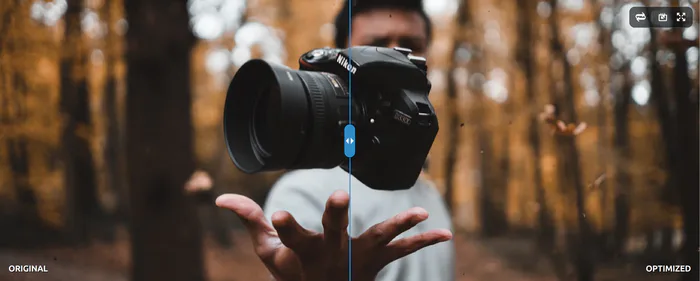
A camera held for a close photograph, representing visual comparison
Compare & preview

See the difference before you save

Open any file into a curtain compare of original vs optimized. Pan, zoom, and drag the divider. The preview follows your current format and quality settings — including animated frames — so you judge the result before writing a batch to disk.

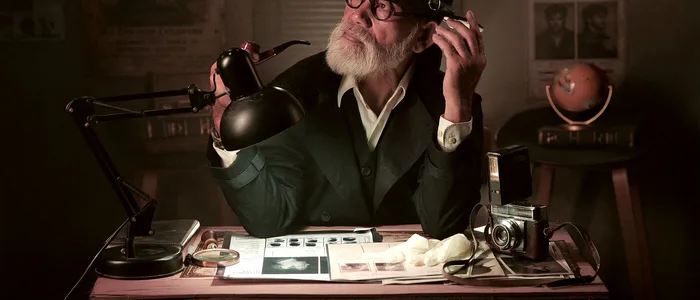
A vintage detective at a lamp-lit desk, examining fingerprints with a magnifying glass
Analysis & automatic optimization

It reads the picture, then picks the settings

Automatic image optimization classifies photos versus drawings, measures texture, and estimates how much quality is already in the file. RIOT then chooses lossless, near-lossless, or lossy encoding — and the right quality and chroma — from HQ down to Eco presets. You can still take full manual control.

A vintage factory assembly line, suggesting image codecs as a production pipeline
Modern codecs

Smaller files, the same picture

JPEG encoding uses progressive scans, intelligent chroma, and high-efficiency compression that keeps photographs sharp at smaller sizes. PNG has a maximum-compression pass for graphics. WebP supports lossless, near-lossless, and lossy. Optimal format tries a smaller container and keeps the original when it already wins.

A camera lens, representing the range of image formats RIOT can open
Supported formats

The formats you actually use

Open JPEG, PNG, WebP, GIF, TIFF, HEIC, and AVIF. Save to JPEG, PNG, WebP, and GIF — or keep the original container. Strip or preserve EXIF, XMP, IPTC, ICC profiles, and other metadata. Transparency can be kept, flattened to a colour, or made opaque.

A camera on a dark surface, suggesting studio batch work
Batch operations

Drop a folder. Walk away.

Add files or whole folders, resize with aspect lock, and quantize palettes when you need fewer colours. File handling covers overwrite, backup, delete originals, and keeping timestamps. A confirmation step protects you before destructive options run.

A film projector, representing animated GIF and WebP support
Animation

Motion stays in motion

Animated GIF, WebP, and AVIF keep their frames through optimization and through compare playback. Prefer a still? Flatten to the first frame. Duplicate GIF frames can be kept or dropped. The preview plays each side with its own delays.

A bright lamp against a dark wall, suggesting light and dark themes
Theme & localization

Fits your desk, speaks your language

Light, dark, or follow the system appearance. The interface is localized in English, Spanish, and Romanian, and you can switch language while the app is running. One binary, your preferred UI.

Download

Get RIOT for your platform

The desktop app is available for macOS, Windows, and Linux. We keep the current release, the previous one, and selected stable builds — each with its own changelog.

View release notes

2026.9stable 1 September 2026 · currentView release notes · Files
News

RIOT 2026.9 — a new generation of the image optimizer

The first release of the rebuilt Radical Image Optimization Tool: a native desktop image optimizer for macOS, Windows, and Linux, with automatic analysis, multi-core batches, and live compare.

Read the announcement
Feedback

User Portal

Report a bug or suggest a feature. Votes from other users help decide what comes next.

Open the portal
Follow

Subscribe to RIOT

Email updates via follow.it, or add the Atom feed to a reader.

Email via follow.it · Atom feed

FAQ

Image optimizer questions

What is an image optimizer?

An image optimizer shrinks JPEG, PNG, WebP, and GIF files while keeping the picture looking right. That is image optimization: fewer bytes on disk and on the wire, same photograph. RIOT does this locally, in a desktop app.

Is RIOT free?

Yes. RIOT has been a free standalone image optimizer since 2008. There is no account and no upload to a service.

Which operating systems are supported?

The current desktop app ships for macOS, Windows, and Linux (AppImage and .deb).